Begin with the fictional example
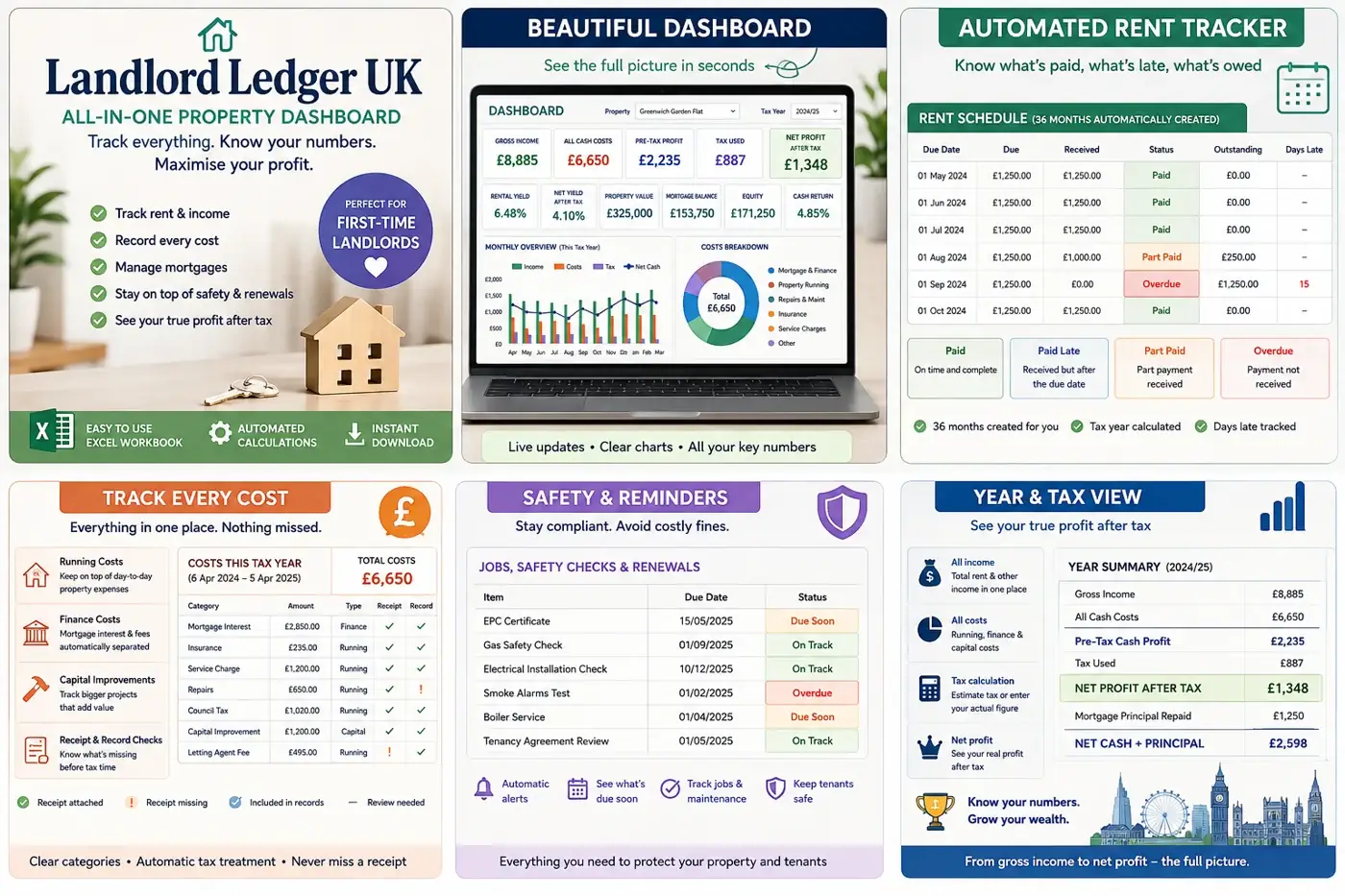
Open the demonstration workbook before you touch the blank one. Landlord Ledger UK includes a fictional London example precisely so the formulas, categories and dashboard can be inspected without putting real tenant or financial information at risk. Follow one property from setup to income, cash costs and the summaries. It is a tour, not a source of figures: none of its amounts or assumptions belongs in a real property record.
Choose a short, complete period
For a first working session, use one property and one recent month for which you can gather the full evidence. A small complete period teaches you more than a year of partly remembered figures. Have the relevant bank statement, rent record, invoices and receipts beside you. HMRC's rental-income record list includes rent received, receipts, invoices and bank statements; the workbook helps organise entries, but it does not replace those underlying records.
Set up the property from documents
Enter the property name or reference consistently and use the dates and details shown in your own documents. If a field is unclear, read the included quick-start guide before guessing. Choose a short label you will recognise in six months, particularly if you manage more than one property. Do not add a tenant's unnecessary personal details to a cash-flow workbook: the ICO's data-minimisation guidance says personal information should be limited to what the purpose actually requires.
Record money when the evidence shows it
Work down the source document in date order. Enter rent received using the actual date and amount shown, then add the property cash costs supported by an invoice, receipt or statement line. Use the workbook’s categories consistently, but treat them as organisational labels rather than automatic tax conclusions. If the bank entry is a combined amount, keep a note of how you arrived at the split instead of forcing it into a category you cannot later explain.
Keep the source trail simple
- Give each document a clear file name or reference that includes its date.
- Add a short note for an unusual amount, refund or correction.
- Keep the original receipt, invoice or statement in your chosen secure filing system.
- Mark any uncertain entry for review rather than silently estimating it.
A spreadsheet is easier to trust when every number can be traced. You do not need to attach private documents to the workbook itself. A consistent reference in the entry and a matching source file in your secure records can be enough to retrace the step without duplicating sensitive information.
Reconcile before reading the dashboard
Compare the month’s rent entries and cash-cost entries with the source documents and check the totals. Look for a missed line, a duplicate, an incorrect date or a refund entered in the wrong direction. Resolve the difference before using the dashboard. A chart can display the workbook perfectly and still tell the wrong story if the rows underneath are incomplete.
The useful question is not ‘Does the dashboard look finished?’ but ‘Can I trace every figure back to its source?’
Use the dashboard to ask questions
Once the period reconciles, review the rent-status checks and monthly cash-flow chart. Treat them as prompts: is a payment later than expected, is one category noticeably different, or is a one-off cost distorting the month? Return to the transaction rows to investigate. The dashboard supports review; it does not decide whether an expense is allowable, calculate an investment decision for you or turn incomplete inputs into reliable advice.
Keep tax judgements outside the first session
HMRC distinguishes between day-to-day allowable expenses, capital expenditure and restricted residential finance costs. Those rules depend on the property, ownership and circumstances. Record the cash movement and retain the evidence, then use the current GOV.UK rental-income guidance or a qualified adviser before treating a workbook category as a tax claim. The file's estimates depend on the information and settings entered; a tidy dashboard is not a tax ruling in a nicer jacket.
Finish with a repeatable routine
Save a dated backup, note the last source document checked and write down the next period to enter. The second session should begin from that note rather than from memory. Landlord Ledger UK includes a clean desktop Excel workbook, fictional demonstration workbook, property setup, income and cash-cost records, dashboard, rent-status checks, monthly cash-flow chart and quick-start guidance. It uses no macros and is designed for a recent desktop version of Microsoft Excel; other spreadsheet apps may change formulas or formatting.
More to read, make and discover
A few useful, interesting and checked routes into the subject.
- UK record keepingGOV.UK: records to keep for rental income
HMRC's current list includes rent received, receipts, invoices, bank statements and allowable-expense records.
- Rental incomeGOV.UK: working out rental income
Official guidance on accurate records, rental income, expenses and the distinction between everyday costs and other tax treatments.
- Data protectionICO: the data-minimisation principle
Why personal information should be adequate, relevant and limited to what is necessary for its purpose.